


What is a Kanban board?
Kanban boards are a visual and intuitive way of laying out cards in a board, across different columns, in such a way that a team can collaborate in the management of a business process. Cards can be used to represent things that need to get done. This can mean an inventory item in a supply chain, or a task in the context of a project, or an issue that needs fixing in a product, or a client that needs to be visited. Kanban boards appeared in Japan as part of the Kanban system.
Kanban boards have become popular in software development, as part of agile methodologies that promote teams to focus on the work actively in progress as part of a sprint. Kanban boards are a very useful tool to visually represent knowledge about the state of the current activities. For instance cards representing tasks can go from a TODO state, to an In Progress, and then Done providing a very quick way to check on the status of each activity for the current sprint. Very useful in team management, and project management scenarios.
Prototyping a Kanban board with JQuery
As a proof of concept for our upcoming team and project management tool Kezmo I set out to prototype a Kanban board in such a way that would allow me to:
- Display cards in four lists displayed vertically, corresponding to the following states: TODO, In Progress, Waiting for Verification, Done.
- Drag and drop cards from one list to another, in such a way that when this happens an event is triggered that I can react to.
- Add new cards to the initial backlog state.
If you are in a hurry and want to check how the end result works, the complete page is listed at the end of this post. Try drag and dropping the list elements.
Starting point, basic html lists
So I started with an html like the following:
<!doctype html>
<html lang="en">
<head>
  <style>
  body {font-family:Arial;}
  h2 {margin:5px;}
  .container {width: 20%; float:left;clear: right;margin:10px; border-radius: 5px;}
  .sortable { list-style-type: none; margin:0; padding:2px; min-height:30px; border-radius: 5px;}
  .sortable li { margin: 3px 3px 3px 3px; padding: 0.4em; padding-left: 1.5em; font-size: 1.4em; height: 18px;}
  .sortable li span { position: absolute; margin-left: -1.3em; }

  .card{background-color:white;border-radius:3px;}
  </style>
</head>
<body>
</body>
<div>
<div class="container" style="background-color:pink;">
<h2>TODO</h2>
<ul class="sortable connectedSortable">
  <li class="card">Activity A1</li>
  <li class="card">Activity A2</li>
  <li class="card">Activity A3</li>
</ul>
</div>
<div class="container" style="background-color:orange;">
<h2>In Progress</h2>
<ul class="sortable connectedSortable" >
  <li class="card">Activity B1</li>
  <li class="card">Activity B2</li>
</ul>
</div>
<div class="container" style="background-color:yellow;">
<h2>Verification</h2>
<ul class="sortable connectedSortable" >
  <li class="card">Activity C1</li>
  <li class="card">Activity C2</li>
</ul>
</div>
<div class="container" style="background-color:green;">
<h2>Done</h2>
<ul class="sortable connectedSortable" >
</ul>
</div>
</div>
</html>
It looks something like the following image:
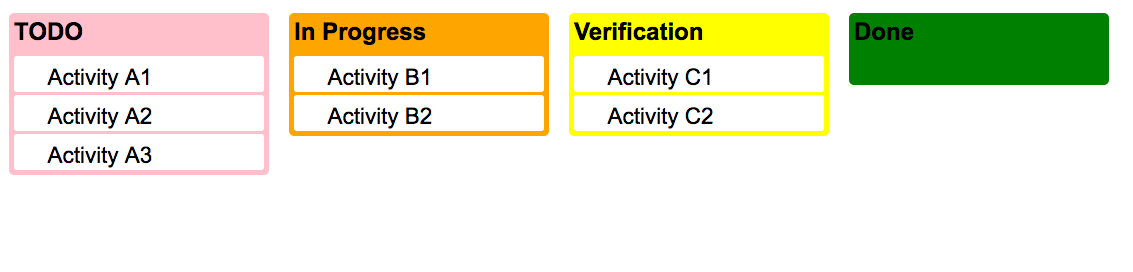
I styled the different lists with different backgrounds, and named the cards with different letters to make sure the elements are moving across columns. I also left the Done list empty to make sure the empty list scenario is also covered by the POC.
The question becomes then how to add behavior to this DOM structure so that users can move items from list to list.
After doing some JQuery research into draggable, and droppable interactions, I came across the sortable jQuery interaction, which can be configured to have connected lists. Awesome I thought! This covers points one and two, I just needed to confirm whether I would be able to listen to elements being dropped to be able to react to that event. Checking out the jQuery api documentation I could confirm it’s possible. I implemented a simple background color change on the item dropped event as a proof of concept.
I enabled the jQuery interactions with the following code:
  <script>
  $(function() {
    $( ".sortable" ).sortable({
      connectWith: ".connectedSortable",
      receive: function( event, ui ) {
      	$(this).css({"background-color":"blue"});
      }
    }).disableSelection();
  });
  </script>
With this I have requirements one and two covered. In order to add the ability to create new cards in the Kanban board I added an input text, and a button, with a corresponding jQuery click handler so that a new li element is added to the TODO list.
You can check the resulting html kanban board here, and the final html code here:
<!doctype html>
<html lang="en">
<head>
  <link rel="stylesheet" href="http://code.jquery.com/ui/1.11.4/themes/smoothness/jquery-ui.css">
  <script src="http://code.jquery.com/jquery-1.10.2.js"></script>
  <script src="http://code.jquery.com/ui/1.11.4/jquery-ui.js"></script>
  <link rel="stylesheet" href="https://jqueryui.com/resources/demos/style.css">
  <style>
  body {font-family:Arial;}
  h2 {margin:5px;}
  input[type=text] {margin:10px}
  input[type=button] {margin:10px}
  .container {width: 20%; float:left;clear: right;margin:10px; border-radius: 5px;}
  .sortable { list-style-type: none; margin:0; padding:2px; min-height:30px; border-radius: 5px;}
  .sortable li { margin: 3px 3px 3px 3px; padding: 0.4em; padding-left: 1.5em; font-size: 1.4em; height: 18px;}
  .sortable li span { position: absolute; margin-left: -1.3em; }

  .card{background-color:white;border-radius:3px;}
  </style>
  <script>
  $(function() {
    $( ".sortable" ).sortable({
      connectWith: ".connectedSortable",
      receive: function( event, ui ) {
      	$(this).css({"background-color":"blue"});
      }
    }).disableSelection();
    $('.add-button').click(function() {
    	var txtNewItem = $('#new_text').val();
    	$(this).closest('div.container').find('ul').append('<li class="card">'+txtNewItem+'</li>');
    });
  });
  </script>
</head>
<body>
</body>
<div>
<div class="container" style="background-color:pink;">
<h2>TODO</h2>
<ul class="sortable connectedSortable">
  <li class="card">Activity A1</li>
  <li class="card">Activity A2</li>
  <li class="card">Activity A3</li>
</ul>
<div class="link-div">
	<input type="text" id="new_text" value=""/>
	<input type="button" name="btnAddNew" value="Add" class="add-button"/>
</div>
</div>
<div class="container" style="background-color:orange;">
<h2>In Progress</h2>
<ul class="sortable connectedSortable" >
  <li class="card">Activity B1</li>
  <li class="card">Activity B2</li>
</ul>
</div>
<div class="container" style="background-color:yellow;">
<h2>Verification</h2>
<ul class="sortable connectedSortable" >
  <li class="card">Activity C1</li>
  <li class="card">Activity C2</li>
</ul>
</div>
<div class="container" style="background-color:green;">
<h2>Done</h2>
<ul class="sortable connectedSortable" >
</ul>
</div>
</div>
</html>
Conclusions & final thoughts
I was able to put this example running in very little time with jQuery. It seems to perform well in Chrome, and Safari while in Firefox the animation every now and then becomes a bit laggy as the number of cards in each column increases. HTML5 provides native support for drag and drop so there might be space to make a more efficient implementation doing without the jQuery layer, and assuming a bit more from the browser.