


In today’s digital landscape, video content has become the cornerstone of user engagement across applications. Whether you’re building an e-learning platform, social media application, or enterprise training system, delivering high-quality video content efficiently is crucial. This blog post explores a comprehensive video streaming solution built on AWS, detailing the technical decisions, architecture choices, and implementation details that make it scalable and robust.
Requirements
Functional Requirements
A comprehensive video streaming solution should address several key functional requirements:
- Video Upload and Processing: Accept video uploads in various formats and convert them to web-optimized streaming formats
- Adaptive Bitrate Streaming: Deliver videos at multiple quality levels (360p, 720p) to accommodate different network conditions and devices
- Secure Content Delivery: Protect video content with signed URLs to prevent unauthorized access
- Thumbnail Generation: Automatically generate video thumbnails for preview purposes
- Event-Driven Processing: Process videos asynchronously without blocking user interactions
- Completion Notifications: Notify applications when video processing is complete
Non-Functional Requirements
The architecture was designed with these critical non-functional requirements in mind:
- Scalability: Handle varying loads from single uploads to thousands of concurrent processing jobs
- Reliability: 99.9% uptime with automatic retry mechanisms and dead letter queues for failed processing
- Performance: Fast video delivery through global CDN with sub-second startup times
- Security: End-to-end encryption, IAM-based access controls, and signed URL protection
- Cost Optimization: Pay-per-use pricing model with efficient resource utilization
- Maintainability: Infrastructure as Code (IaC) approach for consistent deployments and easy updates
Understanding HLS: Why Not Just Serve Plain Video Files?
The Problem with Traditional Video Delivery
Serving plain video files might seem straightforward, but it comes with significant limitations:
- Fixed Quality: Users with slower connections suffer from buffering, while those with fast connections don’t get optimal quality
- Large File Sizes: Potentially downloading entire video files before playback creates poor user experience
- Limited Device Support: Different devices and browsers support different video formats
- No Adaptive Streaming: No ability to adjust quality based on network conditions
HLS: The Solution
HTTP Live Streaming (HLS) is an adaptive bitrate streaming protocol developed by Apple that addresses these challenges:
How HLS Works
HLS breaks videos into small segments (typically 6-10 seconds) and creates multiple quality versions of each segment. It generates:
- Master Playlist (.m3u8): Contains links to all quality variants
- Media Playlists: One for each quality level, listing all segments
- Video Segments (.ts files): Small chunks of the actual video content
video_720p.m3u8
├── segment_001.ts (720p, 10 seconds)
├── segment_002.ts (720p, 10 seconds)
└── segment_003.ts (720p, 10 seconds)
video_360p.m3u8
├── segment_001.ts (360p, 10 seconds)
├── segment_002.ts (360p, 10 seconds)
└── segment_003.ts (360p, 10 seconds)
Benefits of HLS
- Adaptive Bitrate: Players automatically switch between quality levels based on bandwidth
- Fast Startup: Playback begins after downloading just the first segment
- Universal Support: Works across all modern browsers and devices
- Efficient Buffering: Only downloads what’s needed, reducing bandwidth usage
- Live Streaming Support: Can handle both on-demand and live content
AWS MediaConvert: Our Video Processing Engine
What is MediaConvert?
AWS MediaConvert is a file-based video transcoding service that converts media files into formats optimized for playback on various devices. It’s designed to handle everything from simple format conversions to complex broadcast-quality workflows.
Why MediaConvert Over Other Solutions
We chose MediaConvert for several compelling reasons:
1. Broadcast-Quality Processing
- Professional-grade video and audio processing
- Support for advanced features like HDR, Dolby Atmos, and closed captions
- Frame-accurate editing and timing
2. Comprehensive Format Support
- Input: MP4, MOV, MXF, AVI, MPEG-2, and many more
- Output: HLS, DASH, MP4, WebM, and broadcast formats
- Advanced codec support including H.264, H.265, AV1
3. Scalability and Performance
- Automatically scales to handle any workload
- Parallel processing for faster job completion
- No infrastructure management required
4. Cost-Effective
- Pay only for the minutes of video processed
- No upfront costs or minimum commitments
- Predictable pricing based on output duration and complexity
5. AWS Integration
- Native integration with S3, Lambda, EventBridge
- IAM-based security and access controls
- CloudWatch monitoring and logging
MediaConvert Job CloudFormation Template
The following CloudFormation template (AWS Infrastructure as Code) shows an example of how a custom MediaConvert job template can be defined. Note that this is a sample configuration – actual implementations may vary based on specific requirements:
MediaConvertTemplate:
  Type: AWS::MediaConvert::JobTemplate
  Properties:
    Name: !Sub "VideoProcessingTemplate-${AWS::StackName}-${Environment}"
    Description: Generates HLS (360p, 720p) with thumbnails
    SettingsJson:
      OutputGroups:
        - Name: HLS Group
          OutputGroupSettings:
            Type: HLS_GROUP_SETTINGS
            HlsGroupSettings:
              Destination: "s3://output-placeholder/"
              SegmentLength: 10
          Outputs:
            - NameModifier: "_360p"
              VideoDescription:
                CodecSettings:
                  Codec: H_264
                  H264Settings:
                    Bitrate: 800000
                    RateControlMode: CBR
                Width: 640
                Height: 360
            - NameModifier: "_720p"
              VideoDescription:
                CodecSettings:
                  Codec: H_264
                  H264Settings:
                    Bitrate: 1800000
                    RateControlMode: CBR
                Width: 1280
                Height: 720
        - Name: Thumbnail Group
          OutputGroupSettings:
            Type: FILE_GROUP_SETTINGS
          Outputs:
            - NameModifier: "_thumbnail"
              VideoDescription:
                CodecSettings:
                  Codec: FRAME_CAPTURE
                  FrameCaptureSettings:
                    MaxCaptures: 5
This template creates:
- 360p HLS stream: 800 kbps bitrate for mobile and slow connections
- 720p HLS stream: 1.8 Mbps bitrate for mobile/tablets/desktop and fast connections
- Thumbnails: 5 frame captures for video previews
CloudFront: Global Content Delivery
What is CloudFront?
Amazon CloudFront is AWS’s global Content Delivery Network (CDN) service. It delivers content to users from the nearest edge location, reducing latency and improving performance.
Why CloudFront for Video Streaming
1. Global Performance
- 400+ edge locations worldwide
- Sub-second video startup times
- Automatic optimization for video content
2. Bandwidth Efficiency
- Intelligent caching of video segments
- Origin shield for additional caching layer
- Reduced origin server load
3. Security Features
- Signed URLs for content protection
- Integration with AWS Web Application Firewall (WAF)
- DDoS protection included
4. Cost Optimization
- Reduced data transfer costs from origin
- Efficient caching reduces repeated requests
- Pay-as-you-go pricing model
CloudFront Configuration
The following CloudFormation template shows an example CloudFront distribution configured for video streaming:
CloudFrontDistribution:
  Type: AWS::CloudFront::Distribution
  Properties:
    DistributionConfig:
      Origins:
        - Id: VideoOutputOrigin
          DomainName: !GetAtt VideoOutputBucket.DomainName
          S3OriginConfig:
            OriginAccessIdentity: !Sub "origin-access-identity/cloudfront/${CloudFrontOAI}"
      DefaultCacheBehavior:
        TrustedKeyGroups:
          - !Ref CloudFrontPublicKeyGroup
        TargetOriginId: VideoOutputOrigin
        ViewerProtocolPolicy: redirect-to-https
        AllowedMethods:
          - GET
          - OPTIONS
          - HEAD
        ForwardedValues:
          QueryString: true
          Cookies:
            Forward: whitelist
            WhitelistedNames:
              - CloudFront-Key-Pair-Id
              - CloudFront-Policy
              - CloudFront-Signature
Key features:
- Origin Access Identity (OAI): Restricts S3 access to CloudFront only
- Trusted Key Groups: Enables signed URL functionality
- CORS Headers: Allows web applications to access video content
- HTTPS Enforcement: Ensures secure content delivery
Complete Architecture Overview
This video streaming solution implements a modern, event-driven architecture that handles the complete video lifecycle:
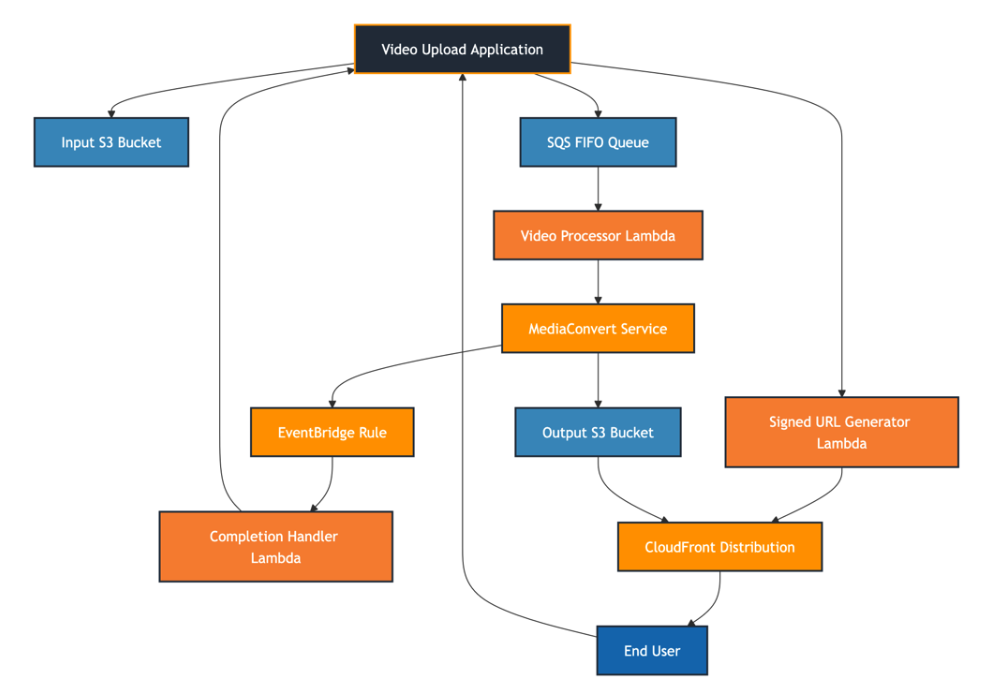
Workflow Description
- Video Upload: Applications upload videos to the input S3 bucket
- Queue Triggering: Application sends a message to the SQS FIFO queue to initiate processing
- Processing Initiation: Lambda function reads from queue and starts MediaConvert job
- Video Conversion: MediaConvert processes video into HLS formats and thumbnails
- Completion Handling: EventBridge captures job completion and triggers notification handler
- Content Delivery: CloudFront serves processed videos with signed URLs for security
Video Retrieval Flow
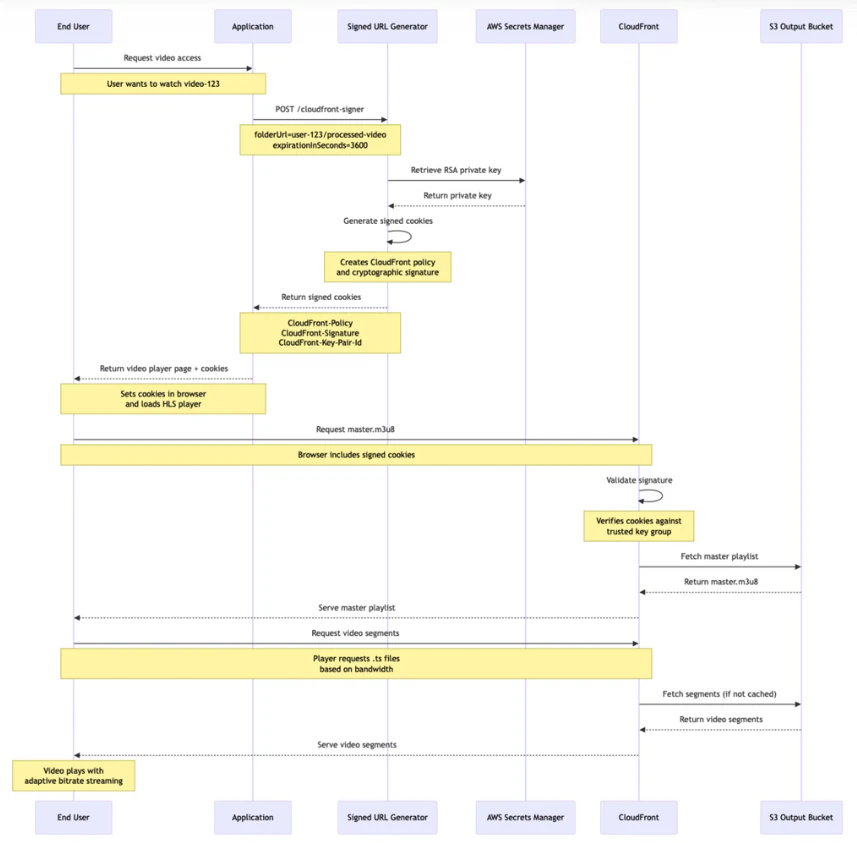
The following sequence diagram shows how end users retrieve and watch processed videos:
Implementation Details: Connecting the Services
1. SQS Queue Configuration
We use a FIFO queue to ensure ordered processing and exactly-once delivery:
VideoEntryQueue:
  Type: AWS::SQS::Queue
  Properties:
    QueueName: !Sub "video-entry-queue-${AWS::StackName}-${Environment}.fifo"
    VisibilityTimeout: 30
    MessageRetentionPeriod: 345600 # 4 days
    FifoQueue: true
    RedrivePolicy:
      deadLetterTargetArn: !GetAtt VideoEntryDLQ.Arn
      maxReceiveCount: 3
Key Features:
- FIFO ordering: Ensures videos are processed in upload order
- Dead Letter Queue: Failed messages are moved for manual inspection
- Visibility timeout: Prevents duplicate processing during Lambda execution
2. Lambda Event Source Mapping
The video processor Lambda is triggered by SQS messages:
SQSEventSourceMapping:
  Type: AWS::Lambda::EventSourceMapping
  Properties:
    EventSourceArn: !GetAtt VideoEntryQueue.Arn
    FunctionName: !GetAtt VideoProcessingFunction.Arn
    BatchSize: 10
    Enabled: true
This configuration allows the Lambda to process up to 10 messages simultaneously, providing efficient throughput while maintaining order.
3. IAM Role for Video Processing
The Lambda function requires specific permissions to orchestrate the workflow:
VideoProcessingRole:
  Type: AWS::IAM::Role
  Properties:
    Policies:
      - PolicyName: VideoProcessingPolicy
        PolicyDocument:
          Statement:
            - Effect: Allow
              Action:
                - sqs:ReceiveMessage
                - sqs:DeleteMessage
              Resource: !GetAtt VideoEntryQueue.Arn
            - Effect: Allow
              Action:
                - s3:GetObject
              Resource: !Sub "${VideoInputBucket}/*"
            - Effect: Allow
              Action:
                - s3:PutObject
              Resource: !Sub "${VideoOutputBucket}/*"
            - Effect: Allow
              Action:
                - mediaconvert:CreateJob
              Resource: "*"
            - Effect: Allow
              Action:
                - iam:PassRole
              Resource: !GetAtt MediaConvertRole.Arn
Security Principle: Each role follows the principle of least privilege, granting only the minimum permissions required for its function.
4. EventBridge Integration
MediaConvert job completion is handled through EventBridge:
MediaConvert job completion is handled through EventBridge:
MediaConvertJobStateChangeRule:
  Type: AWS::Events::Rule
  Properties:
    EventPattern:
      source:
        - "aws.mediaconvert"
      detail-type:
        - "MediaConvert Job State Change"
      detail:
        status:
          - "COMPLETE"
          - "ERROR"
          - "CANCELED"
    Targets:
      - Arn: !GetAtt VideoCompletionHandlerFunction.Arn
        Id: "VideoCompletionHandlerTarget"
This ensures that applications are notified immediately when video processing completes, regardless of success or failure.
5. Video Processing Completion Handler
The completion handler Lambda is responsible for notifying your application when video processing finishes, whether successfully or with errors:
VideoCompletionHandlerFunction:
  Type: AWS::Lambda::Function
  Properties:
    FunctionName: !Sub "video-completion-handler-${Environment}"
    Handler: handler.handler
    Runtime: "nodejs22.x"
    Role: !GetAtt VideoCompletionHandlerRole.Arn
Common Implementation Patterns:
Completion handlers typically implement these core patterns:
1. Webhook Notifications:
Call your application’s webhook endpoint with processing results.
Example Implementation Approach:
Callback endpoints can be passed through the entire workflow by including them in the initial SQS message:
Step 1: Application sends SQS message with callback info
await sqs
  .sendMessage({
    QueueUrl: process.env.VIDEO_ENTRY_QUEUE_URL,
    MessageBody: JSON.stringify({
      videoId: "user-video-123",
      userId: "user-456",
      inputS3Key: "uploads/video.mp4",
      callbackSuccess: "<https://your-app.com/api/videos/123/processing-complete>",
      callbackError: "<https://your-app.com/api/videos/123/processing-failed>",
    }),
    MessageGroupId: "video-processing",
    MessageDeduplicationId: `video-123-${Date.now()}`,
  })
  .promise();
Step 2: Video processor Lambda passes callbacks in userMetadata
const mediaConvertParams = {
  JobTemplate: process.env.MEDIA_CONVERT_TEMPLATE,
  Role: process.env.MEDIA_CONVERT_ROLE,
  UserMetadata: {
    videoId: sqsMessage.videoId,
    userId: sqsMessage.userId,
    callbackSuccess: sqsMessage.callbackSuccess, // Success callback URL
    callbackError: sqsMessage.callbackError, // Error callback URL
  },
  Settings: {
    Inputs: [{FileInput: `s3://${inputBucket}/${sqsMessage.inputS3Key}`}],
    OutputGroups: [
      /* ... output configuration ... */
    ],
  },
};
Step 3: Completion handler implementation
const status = event.detail.status;
const callbackSuccess = event.detail.userMetadata.callbackSuccess;
const callbackError = event.detail.userMetadata.callbackError;

switch (status) {
  case "COMPLETE":
    // POST request to success callback to update application state
    await fetch(callbackSuccess, {method: "POST"});
    console.log(`Success callback invoked: ${callbackSuccess}`);
    break;

  case "CANCELED":
  case "ERROR":
    // POST request to error callback to update application state
    await fetch(callbackError, {method: "POST"});
    console.log(`Error callback invoked: ${callbackError}`);
    break;
}
Why POST Requests?
- Proper HTTP semantics: POST requests are appropriate for state changes in your application
- Simplicity: Your application endpoints can be simple webhooks that just need to know “processing completed”
- Stateless: No need to parse JSON payloads – the callback URL itself can contain any needed identifiers
2. Database Updates:
Update your application’s database with processing results
3.	// Example: Update video status in your database
4.	await dynamodb
5.	  .updateItem({
6.	    TableName: "Videos",
7.	    Key: {videoId: {S: event.detail.userMetadata.videoId}},
8.	    UpdateExpression: "SET #status = :status, #processedAt = :timestamp",
9.	    ExpressionAttributeNames: {
10.	      "#status": "status",
11.	      "#processedAt": "processedAt",
12.	    },
13.	    ExpressionAttributeValues: {
14.	      ":status": {S: event.detail.status},
15.	      ":timestamp": {S: new Date().toISOString()},
16.	    },
17.	  })
  .promise();
EventBridge Event Structure:
The completion handler receives detailed information about the MediaConvert job. Here are the key fields you’ll typically use:
{
  "source": "aws.mediaconvert",
  "detail-type": "MediaConvert Job State Change",
  "detail": {
    "jobId": "1671476818694-phptj0",
    "status": "COMPLETE",
    "userMetadata": {
      "videoId": "user-video-123",
      "userId": "user-456"
    },
    "outputGroupDetails": [
      {
        "outputDetails": [
          {
            "outputFilePaths": ["s3://output-bucket/video_720p.m3u8"],
            "durationInMs": 30041
          }
        ],
        "type": "HLS_GROUP"
      },
      {
        "outputDetails": [
          {
            "outputFilePaths": ["s3://output-bucket/thumbnail_001.jpg", "s3://output-bucket/thumbnail_002.jpg"]
          }
        ],
        "type": "FILE_GROUP"
      }
    ],
    "warnings": [
      {
        "code": 230001,
        "count": 1
      }
    ]
  }
}
Key Fields for Your Application:
- detail.status: Job completion status (COMPLETE, ERROR, CANCELED)
- detail.jobId: Unique identifier for tracking the job
- detail.userMetadata: Custom data you passed when creating the job (e.g., your video ID, user ID)
- detail. outputGroupDetails[].outputDetails[].outputFilePaths: URLs to the generated video files and thumbnails
- detail.outputGroupDetails[].type: Whether it’s HLS video (HLS_GROUP) or thumbnails (FILE_GROUP)
- detail.warnings: Any non-fatal issues during processing
This rich event data enables sophisticated processing logic and comprehensive application notifications.
6. Secure Content Delivery
CloudFront signed URLs provide time-limited, secure access to video content:
CloudFrontSignerFunction:
  Type: AWS::Lambda::Function
  Properties:
    Environment:
      Variables:
        SECRET_NAME: !Ref SecretIdentifier
        KEY_PAIR_ID: !Ref CloudFrontPublicKey2025
        CLOUD_FRONT_URL: !Sub "https://${CloudFrontDistribution.DomainName}"
What the CloudFront Signer Lambda does:
Input: The Lambda receives HTTP requests with query parameters:
•	GET /cloudfront-signer?folderUrl=user-123/processed-video&expirationInSeconds=3600
•	GET /cloudfront-signer?url=user-123/video.mp4&expirationInSeconds=3600
Processing: The Lambda function:
- Retrieves the RSA private key from AWS Secrets Manager
- Supports two signing modes:
- Single URL signing: Creates a signed URL for one specific file
- Folder signing: Creates signed cookies for accessing all files in a folder
- Sets expiration time (defaults to 1 hour if not specified)
- Generates cryptographic signatures using the private key
Output: Returns different responses based on the request:
For folder access (HLS videos):
{
  "url": "https://d1234567890.cloudfront.net/user-123/processed-video",
  "signedUrl": null,
  "folderUrl": "https://d1234567890.cloudfront.net/user-123/processed-video",
  "cookies": {
    "CloudFront-Policy": "eyJTdGF0ZW1lbnQi...",
    "CloudFront-Signature": "abc123...",
    "CloudFront-Key-Pair-Id": "APKA..."
  }
}
For single file access:
{
  "url": "https://d1234567890.cloudfront.net/user-123/video.mp4",
  "signedUrl": "https://d1234567890.cloudfront.net/user-123/video.mp4?Policy=eyJ...&Signature=abc123...&Key-Pair-Id=APKA...",
  "folderUrl": null,
  "cookies": null
}
The signing process involves:
- Private Key Storage: RSA private key stored securely in AWS Secrets Manager
- Public Key Registration: Public key registered with CloudFront
- URL Generation: Lambda creates time-limited, cryptographically signed URLs
- Access Control: CloudFront validates signatures before serving content
Security Benefits:
- Time-limited access: URLs automatically expire after the specified duration
- Tamper-proof: Any modification to the URL invalidates the signature
- Origin protection: Direct S3 access is blocked; content only accessible via CloudFront
- User-specific: Can generate different URLs with different permissions for each user
7. Access Management for Applications
A dedicated IAM group provides controlled access for applications:
RunnersGroupPolicy:
  Type: AWS::IAM::Policy
  Properties:
    PolicyDocument:
      Statement:
        - Effect: Allow
          Action:
            - sqs:SendMessage
          Resource: !GetAtt VideoEntryQueue.Arn
        - Effect: Allow
          Action:
            - s3:PutObject
            - s3:GetObject
          Resource: !Sub "${VideoInputBucket}/*"
        - Effect: Allow
          Action:
            - lambda:InvokeFunction
          Resource: !GetAtt CloudFrontSignerFunction.Arn
This allows applications to:
- Upload videos to the input bucket
- Trigger processing by sending SQS messages
- Generate signed URLs for content delivery
Conclusion
This AWS-based video streaming solution demonstrates how modern cloud services can be orchestrated to create a robust, scalable, and secure video delivery platform. By leveraging HLS for adaptive streaming, MediaConvert for professional-quality transcoding, and CloudFront for global delivery, this architecture provides a solution that meets both current needs and future growth requirements.
The event-driven architecture ensures efficient resource utilization while maintaining high availability and performance. The Infrastructure as Code approach using CloudFormation provides consistency, reproducibility, and easy maintenance across different environments.
This architecture serves as a solid foundation for any application requiring video streaming capabilities, from educational platforms to social media applications, providing the scalability and reliability that modern users expect.
Building a production-ready video streaming solution? OrangeLoops specializes in architecting and deploying scalable cloud infrastructure for digital products that need to handle real-world demand. Our Cloud Studio has deep expertise in AWS services, serverless architectures, and event-driven systems — from MVP to enterprise scale. Whether you’re building an e-learning platform, social video app, or enterprise training system, we bring the product mindset and technical execution to make it work seamlessly. Schedule a technical consultation to discuss your video streaming needs, or explore our Cloud & Backend solutions to see how we build infrastructure that scales.