Turning 30 Minutes of Spreadsheet Work into a Single Prompt
How we built a production MCP connector for Harvest and Forecast that turns planned-vs-tracked hours analysis into one prompt.
Most enterprise teams don’t lack data. They lack the ability to get at it quickly enough to make decisions. If you’ve ever spent 30 minutes exporting CSVs from Harvest, cross-referencing them with Forecast assignments in a spreadsheet, and manually adjusting for PTO just to answer “are we on track this week?”, this article is for you.
At OrangeLoops, we build custom AI integrations for enterprise clients. Over the past year, one pattern has come up repeatedly: operations leaders want to ask their AI assistant a plain-language question about their business – hours logged, capacity available, projects at risk – and get an accurate answer grounded in live data. Not a hallucinated guess. Not a summary of last month’s report. A real answer, computed from the source systems, right now.
To make that possible with Harvest and Forecast, we built a production-grade MCP connector that unifies both platforms into a single integration layer accessible from Claude Desktop, Claude.ai, and other MCP-compatible hosts. The core version is open source on GitHub, and a full enterprise edition is available for teams that need OAuth, advanced analytics, and custom reporting.
In Short
- We built a production MCP connector that unifies Harvest time tracking and Forecast capacity planning.
- The connector turns planned-vs-tracked hours analysis from spreadsheet work into a single natural-language prompt.
- The enterprise version includes OAuth 2.0 with PKCE support, multi-tier caching, deterministic server-side reporting, and 49 tools.
- The same pattern applies to CRMs, ERPs, project management tools, financial systems, HRIS platforms, and proprietary internal platforms.
> Two demo videos show the connector in action: monthly hours by project in Claude and an Excel report with project and team-member subtotals, both generated from Harvest data.
What Is MCP?
MCP – the Model Context Protocol – is an open standard originally created by Anthropic that defines how AI applications connect to external systems where context, data, and tools live.
Think of it as USB ports for AI: a standard interface that lets AI agents discover and invoke capabilities exposed by external systems, without every developer having to hand-code bespoke API integrations.
An MCP server exposes three core capabilities:
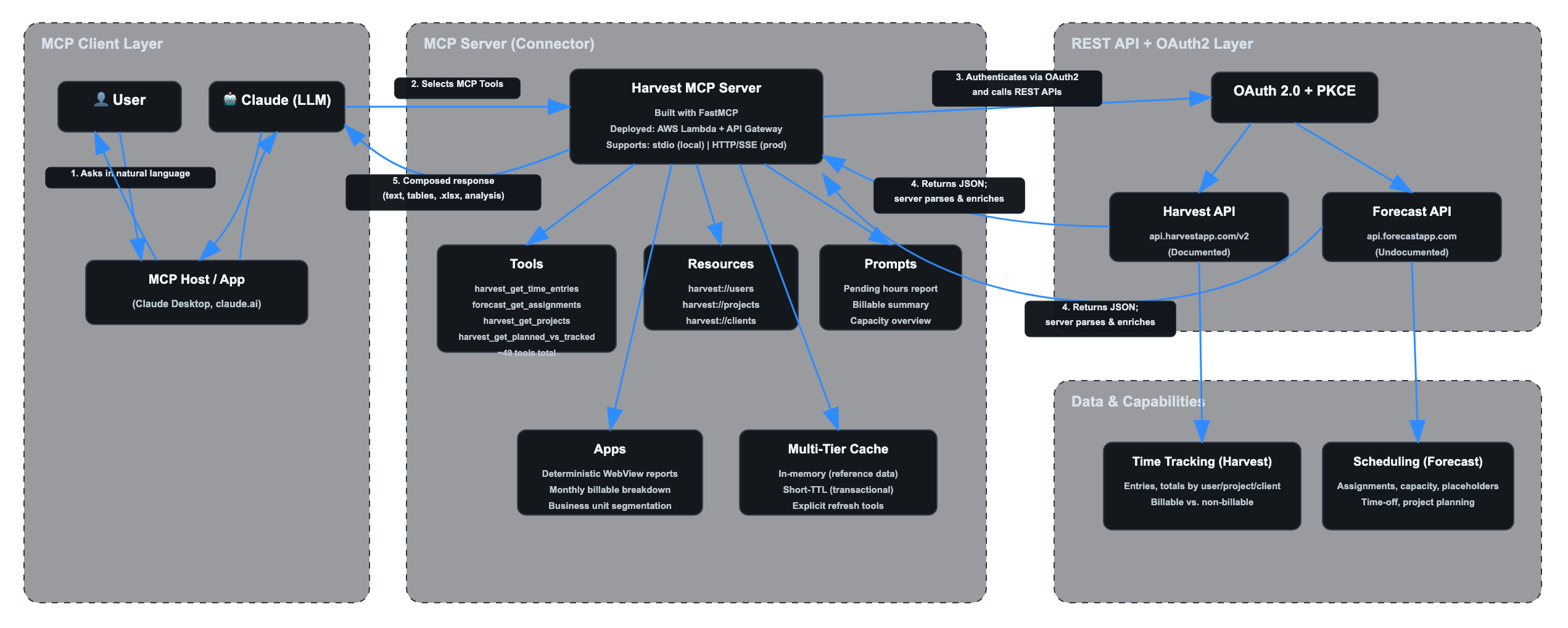
- Tools – Invocable functions the AI agent can call. Our connector exposes 49 tools in the enterprise version, covering everything from harvest_get_time_entries and forecast_get_user_assignments to cross-system analytics like harvest_get_planned_vs_tracked.
- Resources – Queryable data exposed as URIs, such as harvest://users and harvest://projects. These can be attached as context to conversations, giving the model structured background knowledge without requiring an explicit tool call.
- Prompts – Reusable interaction templates optimized for specific workflows. For example, “Generate a pending hours report for client X for the current period” can orchestrate the right sequence of tool calls with deterministic, repeatable results.
In clients that support MCP Apps, the server can also render deterministic WebViews. The key distinction: the LLM does not generate the HTML. The MCP server does. That means a monthly billable hours report can look consistent across supported clients and model versions.
The practical effect: once a SaaS platform has an MCP server, any MCP-compatible AI client can interact with it. You write the integration once, and it can work across compatible hosts.
Challenge 1: Unifying Two Disconnected APIs into One Channel
Harvest has a documented REST API at api.harvestapp.com/v2. It works, but report-level questions often require stitching endpoints together. You can filter raw time entries by user, client, project, task, and date, but turning that into the exact operational answer you need still means aggregating and assembling the result yourself.
Forecast is harder. Its API at api.forecastapp.com is undocumented and unsupported. There are no official docs, no vendor-backed client libraries, and no guarantees of stability. We reverse-engineered it from the web application’s network traffic.
The MCP server abstracts both behind a single set of tools. The AI agent and the end user do not need to know which API is being called, or that one of them is undocumented. When a user asks “Who’s assigned to Project Alpha next week and how many hours have they logged so far?”, the connector knows to pull assignments from Forecast and time entries from Harvest, merge the results by user, and return a unified answer.
The tool harvest_get_planned_vs_tracked is a good example of this unification in practice. It cross-references assignments from Forecast against time entries from Harvest, accounts for time-off and holidays, and computes the delta with the project, PTO, holiday, and reporting logic operations teams need – beyond what either API exposes as a ready-to-use workflow on its own.
Challenge 2: Planned vs. Tracked Hours – The Killer Use Case
If you run a services business, you know this pain. Every week, operations managers need to answer a deceptively simple question: are people logging the hours they were planned for?
Getting that answer manually involves pulling up Forecast to see who was assigned to which projects and for how many hours, then switching to Harvest to see what was actually logged, then reconciling the two in a spreadsheet. For a single client with three active projects and eight team members, this can take 30-45 minutes. For an entire portfolio, it’s a half-day exercise.
The connector resolves this end to end in a single prompt invocation.
Prompt Examples
Here is what that looks like in practice.
Prompt example: Monthly hours by project for Client A
In this example, the user asks Claude to create a bar chart showing total hours logged for Client A last month, grouped by project. The connector resolves the date range, calls the Harvest tool for project-level time totals, and returns a visual breakdown with total hours, billable hours, summary metrics, and a short interpretation.
Prompt example: Hours by project and team member for Client A
In this example, the user asks Claude to summarize Client A hours by project and team member. The connector asks for the missing date range, pulls the Harvest time entries, and generates both a summary table and a stacked bar chart inside Excel.
Under the hood, it follows a deterministic sequence:
1. Identify active projects for the client.
2. Discover team members across those projects.
3. Pull Forecast assignments for the period, adjusting for time-off and holidays.
4. Pull Harvest time entries for the same period.
5. Compute per-person deltas.
6. Flag under-reported weeks.
Design Principle: The server computes; the model communicates.
This intelligence lives inside the MCP server, not in the LLM. The calculations are deterministic and model-independent. The LLM’s job is to understand the user’s question, invoke the right tool, and present the result – not to do arithmetic on time data. We do not want the accuracy of a billable hours report to depend on whether the model can do math correctly.
The result is a report that an operations manager can trust. Not “approximately” correct. Correct.
Challenge 3: Caching Strategy to Work Around API Rate Limits
Harvest enforces rate limits that vary by API area: general API calls are capped at 100 requests per 15 seconds, while Reports API calls are capped at 100 requests per 15 minutes. For report-heavy conversational workflows, caching is still mandatory. Forecast, being undocumented, has even less predictable limits.
For a conversational AI interface, this is a serious constraint. A single user question might require 5-10 API calls to answer. A follow-up question might need many of the same data points. Without caching, you’d burn through your rate limit in a few exchanges.
We implemented a multi-tier caching strategy:
- In-memory cache for reference data. Users, projects, clients, and roles are loaded once per session and served from memory for subsequent requests.
- Short-TTL cache for transactional data. Time entries and assignments change more frequently, but not between consecutive questions in the same conversation.
- Explicit cache-busting tools. When the user knows data has changed, `harvest_refresh_cache` or `forecast_refresh_cache` forces a reload on demand.
The result: after the first query in a session primes the cache, most follow-up queries complete without hitting the upstream API at all. Conversations feel instant, and rate limits are rarely approached.
Challenge 4: OAuth 2.0 as the SSO On-Ramp
Most open-source Harvest MCP connectors we reviewed require the user to manually generate a personal API key from their Harvest account settings and paste it into a JSON configuration file. For a developer experimenting on their own machine, that’s fine. For an enterprise deployment rolling this out to a 50-person operations team, it’s a non-starter.
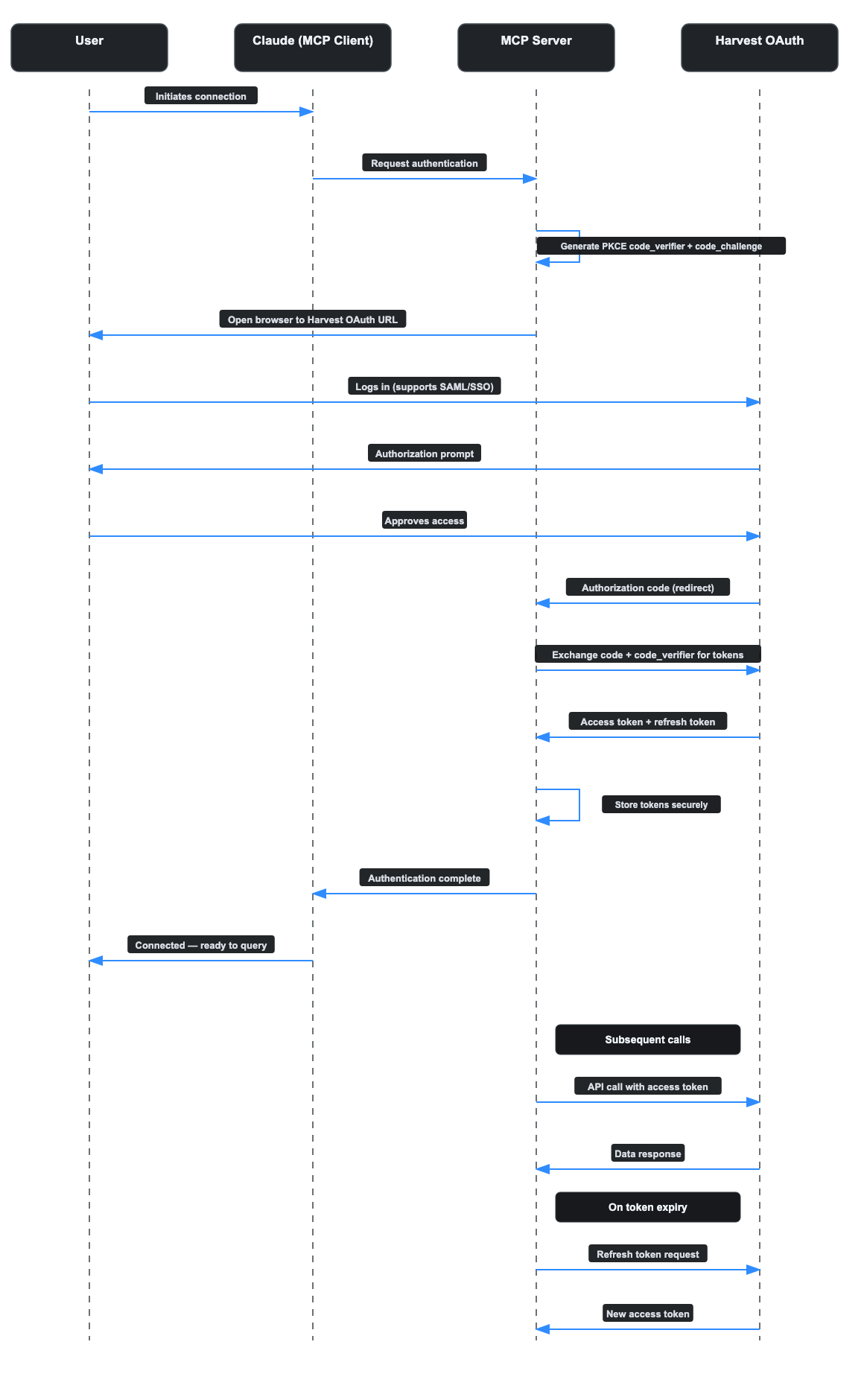
Our enterprise connector uses OAuth 2.0 with PKCE support (Proof Key for Code Exchange), delegating authentication to Harvest’s own login screen while the connector handles the token exchange and lifecycle. The flow looks like this:
1. The user clicks “Connect” in their MCP client.
2. A browser window opens to Harvest’s OAuth authorization page.
3. The user logs in with existing Harvest credentials, including SAML/SSO if configured.
4. Harvest redirects back with an authorization code.
5. The MCP server exchanges the code for access and refresh tokens.
6. Subsequent API calls use the access token automatically; when it expires, the refresh token obtains a new one without user intervention.
The user never sees an API key. IT admins do not need to provision credentials. The security model respects existing Identity Provider configurations. The token lifecycle – refresh, expiry, revocation – is handled by the connector.
This is the difference between a developer tool and an enterprise product.
How It Fits Together
The following diagram illustrates the full system architecture, from user interaction to API response.
OAuth 2.0 PKCE Flow
Open Source vs. Enterprise
We believe in giving the community a genuinely useful starting point while offering a path to production for teams that need it.
| Capability | Open Source | Enterprise |
|---|---|---|
| Core Harvest tools: clients, projects, time entries, users | Yes | Yes |
| Core Forecast tools: assignments, capacity, users | Yes | Yes |
| OAuth 2.0 auth / PKCE support | No, API key | Yes |
| Planned vs. tracked analysis | Basic | Advanced, multi-project and PTO-aware |
| Caching layer | Basic | Multi-tier with TTL tuning |
| MCP Apps / deterministic WebViews | No | Yes |
| Custom prompts and resources | Sample set | Tailored to client workflows |
| Deployment | Local stdio | AWS Lambda + API Gateway, HTTP/SSE |
| Support | Community | Dedicated |
The open-source version covers the core tools for both Harvest and Forecast, runs locally via stdio, and includes sample prompts and a basic caching layer. It’s a fully functional connector that you can install today and start querying from Claude Desktop.
You can review the implementation and installation instructions in the open-source repository.
The enterprise version adds OAuth-based authentication, the advanced planned-vs.-tracked analysis engine, multi-tier caching with configurable TTLs, MCP Apps for deterministic report rendering, and production deployment on AWS Lambda with API Gateway for HTTP/SSE transport.
What Makes This Production-Grade?
A production-grade MCP connector is not just an API wrapper. It needs:
- Enterprise authentication, including OAuth 2.0 with PKCE support instead of personal API keys.
- Rate-limit handling through caching, TTL tuning, and controlled refreshes.
- Deterministic computation inside the server, not arithmetic delegated to the LLM.
- Deployment architecture that supports shared team usage, not only local stdio.
- Clear tool boundaries, permissions, and support expectations.
The important distinction is where the business logic lives. If planned-vs.-tracked analysis happens inside the model, the result is difficult to test and vulnerable to model changes. If the computation happens inside the MCP server, the output is deterministic, auditable, and model-agnostic.
Known Limitations
- Forecast API instability. Forecast’s API is undocumented and unsupported, so it can change without notice.
- Harvest rate limits at scale. Harvest’s request limits vary by API area and are manageable for conversational use, but bulk-data or report-heavy scenarios require caching and careful query design.
- MCP Apps support depends on the client. Tools, resources, and prompts are the portable MCP layer; deterministic WebView rendering depends on host support.
Why MCP – and Why Now
If you’re an engineering leader evaluating how to connect your SaaS stack to AI agents, the question isn’t whether to build integrations. It’s how.
You could write custom function-calling code for each model provider. You could build a middleware layer with bespoke adapters. Or you could adopt an open standard that decouples the integration from the model.
MCP is that standard. It’s model-agnostic, client-agnostic, and backed by a growing ecosystem of hosts and servers. Building an MCP server for your internal tools means that integration works with Claude today and can work with compatible hosts tomorrow. It’s a bet on interoperability.
The Harvest/Forecast connector is one example of what this looks like in practice. The pattern generalizes. Any SaaS platform with a REST API, documented or not, can be wrapped in an MCP server that exposes tools, resources, and prompts to compatible AI clients.
This is what we call Agentic Infrastructure: the integration layer that makes existing systems queryable and actionable by AI agents. The same architecture applies to CRMs, ERPs, project management tools, financial systems, HRIS platforms, and proprietary internal platforms.
Get Started
If you use Harvest and/or Forecast: Try the open-source connector. Install it, connect it to Claude Desktop, and start asking questions about your time data in natural language. If you need OAuth, multi-project planned-vs.-tracked analysis, or custom reporting for your team, contact us.
– Open-source repository: https://github.com/orangeloops/harvest-mcp
If you’re an enterprise exploring AI agents: We build MCP connectors for proprietary and third-party systems. If your team needs to plug AI assistants into your existing SaaS stack, whether that’s a documented API or an undocumented one, start with a technical conversation.
If you’re on the Harvest or Forecast team: We’ve built deep expertise on your APIs, including the undocumented ones, and would like to explore a partnership to bring an official MCP connector to your customers. Reach out.
FAQ
What is an MCP connector?
An MCP connector is an integration layer built on the Model Context Protocol that exposes an external system’s data and functions to AI clients through structured tools, resources, and prompts. It lets AI agents interact with SaaS platforms through natural language while keeping data access and computation inside the server.
What is an MCP server?
An MCP server is the software component that implements the Model Context Protocol on the server side. It exposes tools, resources, and prompts to compatible AI clients, handles calls to external systems, and returns structured results.
Why connect Harvest and Forecast through MCP?
Harvest tracks time entries. Forecast manages project assignments and capacity. Neither system offers the full cross-system planned-vs.-tracked workflow we needed as a ready-to-use conversational analysis layer. An MCP connector spanning both platforms can answer questions like “are people logging the hours they were planned for?” in a single prompt.
What makes this connector production-grade?
The enterprise connector includes OAuth 2.0 with PKCE support, multi-tier caching, deterministic server-side reporting, AWS Lambda and API Gateway deployment, and 49 tools. The important point is that operational calculations happen in the server, not inside the LLM.
How is this different from a normal API integration?
A normal API integration usually connects one application to another specific application. An MCP connector exposes a system’s capabilities through a standard protocol so compatible AI clients can discover and use them without a custom integration for each host.
When should a company build a custom MCP connector?
A custom MCP connector makes sense when an important system has specialized workflows, proprietary data, undocumented APIs, sensitive access requirements, or business logic that should be deterministic and auditable. Commodity integrations may be better handled by managed platforms.
About OrangeLoops
OrangeLoops is an AI-native product engineering company based in Boston and Montevideo. Our Agentic Infrastructure work helps teams make existing enterprise systems queryable and actionable by AI agents, including MCP connectors for SaaS tools, proprietary platforms, and systems with undocumented APIs. We build agents and integrations governed by engineers, not demos held together by prompts.